

What is hertz on a monitor?
With the development of display technology, most monitors currently feature rich colors and vivid images, extremely fast response speeds, and fast image processing capabilities. When choosing a monitor, we need to consider some basic parameters. You may often hear the parameters 60 Hz, 120 Hz, 240 Hz, etc. So what is the Hertz value specified on the monitor, and why is it a very important parameter for the monitor? We will describe some basic concepts and introductory knowledge to help us better understand the monitor's parameters.

|
Table of Contents [Hide] |
What is a Monitor Refresh Rate?
The refresh rate in Hertz indicates how many times the electron beam repeatedly scans the image on the monitor screen. In layman's terms, it is the frequency at which the screen updates per second. The higher the refresh rate, the more images are updated per second, and the more stable and clear the image. Conversely, with a low refresh rate, the image is prone to flickering and trembling. Theoretically, the more images updated per second, the smoother it is. 60 Hz means the images are updated 60 times per second, and 144 Hz means the images are updated 144 times per second. In comparison, the smoothness is more than twice as high. When gaming or watching videos, a higher refresh rate can also lead to a better experience. Generally, the experience offered by a high-refresh-rate monitor is better.

A 2009 study by Indiana University found that normal people have a resolution limit for frame rates between 50 and 60 frames, and it is difficult to perceive the difference beyond this threshold. But for some e-sports players or gamers, even the gap between 144 Hz and 240 Hz can be noticed.
With the exception of professional e-sports players, normal users are only divided into FPS gamers and others. Even if we use a computer every day to browse pages and drag the mouse, it feels smoother with a high refresh rate, especially when upgrading from 60 Hz to 144 Hz. To keep the budget under control, however, 60 Hz is cheaper. Furthermore, for daily office work or watching movies, for example, there is no requirement for the refresh rate, and the higher refresh rate merely provides smoother operational feedback.
It is an inherent characteristic of monitors that the higher the refresh rate, the better the stability of the displayed image. The refresh rate directly determines the price, but since refresh rate and resolution restrict each other, only a monitor with a high refresh rate at high resolution can be described as having excellent performance. With conventional monitors, the lower the refresh rate, the more the image flickers and trembles, and the faster the eyes fatigue. Sometimes it causes sore eyes, dizziness, and other symptoms. Since 60 Hz is only close to the refresh rate of fluorescent lamps, the monitor produces an uncomfortable stroboscopic effect at a refresh rate of 60 Hz.
What is FPS?
FPS stands for Frames Per Second. The frame rate indicates the speed of screen updates. For example, 60fps means that 60 screens are updated in one second, and the frame rate is largely determined by the performance of the graphics card. The stronger the performance of the graphics card, the higher the frame rate. FPS is an indicator for measuring the speed at which the graphics card or GPU creates images on the screen.

Refresh Rate vs. FPS
Refresh rate and FPS (frames per second) are related concepts and influence each other, but they refer to different things.
The refresh rate is an index that measures how many images a display can update per second. This is related to the inherent properties of the monitor. It is measured in Hertz. A higher refresh rate means that the display updates more often and the screen is smoother. And FPS (Frames Per Second) is an index for measuring the ability of the graphics card or GPU to draw frames per second, which depends on the performance of the hardware generating the content, with frames per second being the unit, meaning higher FPS means finer details and smoother movements.
What are the Different Monitor Refresh Rates?
So you understand what Hertz on a monitor and what FPS are. We actually need to distinguish the difference between refresh rate and frame rate. But what exactly are the differences between 60, 120, 144, and 240 Hz monitors? In this section, we will go through the different refresh rate values as well as the pros and cons of each type.
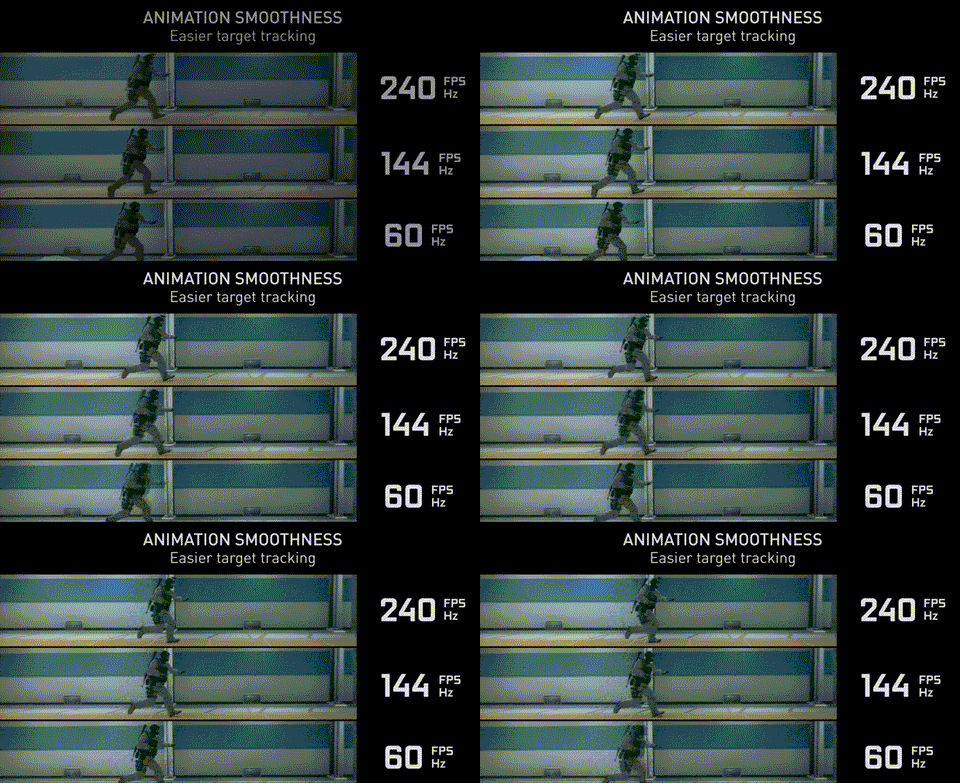
60 Hz Monitors
60 Hz monitors are currently the mainstream on the market, and most manufacturers have adopted 60 Hz as the basic parameter for ordinary monitors. For general office or web browsing requirements, 60 Hz can already meet most needs, and there is no need to consciously choose a monitor with a high refresh rate.
But for gaming, the current mainstream monitor configuration is still 1080P at 60 Hz. For most games, 60 Hz can also meet most requirements, unless it is a first-person shooter or action combat game. The higher, clearer, and smoother the image display, the better the gaming results. For the human eye: 20–30 FPS: basically fluid, 30–60 FPS: fluid, 60+FPS: very fluid. Based on this conclusion, many players cannot feel the difference between 144 Hz and 60 Hz, as a 60 Hz refresh rate can guarantee that the screen's frame rate reaches 60 FPS and achieves a very fluid level.

Considering the cost, a 60 Hz monitor is the better choice. Office monitors have no special requirements for the refresh rate. For gaming, a 60 Hz monitor can already meet the demands of most games. Instead of increasing the monitor's refresh rate, if you want a better gaming experience, you can increase the monitor's resolution. This will make the image quality clearer and the colors richer.
120 Hz Monitors
When we talk about 120 Hz monitors, it's more about comparing 120 Hz monitors to 60 Hz monitors. For ordinary office work, the 120 Hz monitor has little effect compared to the 60 Hz monitor, and the image is relatively fluid.
For gamers, this will be a very significant improvement. The 120 Hz monitor not only improves image quality and fluidity but also provides an exceptional gaming experience. A simple example: if the game is 60 Hz, the first frame is 0 milliseconds and the second frame is 16.6 milliseconds.
You perform an operation at 1 millisecond, and for the game, the actual effect of this operation only takes effect after 16.6 milliseconds. That means it actually took 15.6 milliseconds for the effect to materialize. But what if your game itself runs at 120 Hz and the monitor at 60 Hz? Then the game generates the second frame at 8.3 milliseconds. Although this frame is not actually displayed, it has an effect due to the game's logic. We saw the third frame played at 16.6 milliseconds, but by then your move had already been played with the 8.3 millisecond frame. That means, even if the display remains unchanged at 60 Hz, a 120 Hz game allows you to execute your moves at 8.3 milliseconds, while a 60 Hz game might take 16.6 milliseconds to play your moves. Although you won't see the display update until 16.6 milliseconds, the game logic has already set the action of this move at 8.3 milliseconds, and your move is half a frame earlier. If your monitor is a 120 Hz monitor synchronized with the game at this time, we can see the current operation in 8.3 milliseconds, which leads to a greatly increased streaming of the game screen.

Similarly, for a first-person shooter game, switching from a 60 Hz monitor to a 120 Hz monitor is a big leap. Compared to the 60 Hz monitor, the overall effect of the 120 Hz monitor is significantly improved, taking the gaming experience to a better level. At the same time, 120 Hz monitors are cheaper compared to 144 Hz monitors, so 120 Hz monitors will be the more cost-effective choice.
144 Hz Monitors
A 144 Hz monitor updates an image in about 7 milliseconds. Compared to 16 milliseconds at 60 Hz, the image is undoubtedly significantly better, so the overall quality improvement is visible to the naked eye, while at 120 Hz it takes 8 milliseconds, meaning that 120 Hertz monitors and 144 Hertz monitors do not make a huge difference.

If you are a gamer, a 120 Hz monitor should be more than sufficient for most games, even first-person shooters. A 144 Hz monitor is not a huge improvement over a 120 Hz monitor. However, if you are using a 60 Hz monitor and want a better gaming experience, we recommend upgrading to a 120 Hz or 144 Hz monitor. With a 120 Hz monitor, you might save some money.
Is a Higher Refresh Rate Better?
The answer is not necessarily. It depends on many factors. The first is the cost issue. As mentioned earlier, a 60 Hz monitor is cheaper than a 120 Hz monitor and a 144 Hz monitor. If you have a 120 Hz monitor, replace it with a 144 Hz monitor. The overall improvement is not great, but the price is higher.
This must also match your other configuration, such as a graphics card or GPU. If your graphics card can achieve an output frame rate of 120 Hz and your monitor only has a refresh rate of 60 Hz, the additional frame rate is not meaningless, but the fact is that the additional frame rate is also a great help! Why?
If the game screen on a 60 Hz monitor also has 60 fps, the actual display effect is often below 60 fps. This is because it is difficult to maintain the uniformity of the time interval of each frame of the graphics card's rendering output. Even if your game, for example, reaches the 60-frame standard on a 60 Hz monitor, this does not mean that the frame generation time is stable enough. If the number of frames (FPS value) achieved by the graphics card's performance is higher, the actual number of frames output on the monitor screen is more stable, and the additional frames can better reduce input and output latency and provide better image quality output, smoother response.
It should be noted, however, that the game's frame rate must not be significantly higher than the monitor's refresh rate, otherwise the effect is counterproductive. It can lead to frame skipping, screen tearing, and even headaches and dizziness.
Conclusion
What is Hertz on a monitor? Hertz refers to the unit of the display's refresh rate. In general, common refresh rates are 60 Hz, 120 Hz, and 144 Hz. However, higher refresh rates are not always better; various factors must be considered. Nevertheless, a higher refresh rate often leads to a better gaming experience and smoother image quality and visuals.
FAQs
Q1: Why is Hertz important for monitors and how does it affect my viewing experience?
The refresh rate, measured in Hertz, directly influences how smoothly images are transmitted on your screen. A higher Hertz value, such as 144 Hz or 240 Hz, improves motion fluidity, making it crucial for gaming and fast-paced content consumption.
Q2: What sets UPERFECT monitors apart from the competition?
UPERFECT combines elegant design with cutting-edge technology. Their monitors often feature high refresh rates, vibrant color reproduction, and thoughtful ergonomic design, ensuring a pleasant visual experience for users across various activities.
Q3: Can I use a high-refresh-rate monitor for everyday tasks, or is it only beneficial for gaming?
While high-refresh-rate monitors are game-changers for gamers, they also bring noticeable improvements to everyday tasks. Smoother cursor movements, seamless scrolling, and reduced motion blur contribute to an overall enhanced user experience.
Q4: Are UPERFECT monitors suitable for professional applications like graphic design and video editing?
Absolutely! Many UPERFECT monitors offer precise color reproduction, high resolutions, and wide viewing angles, making them ideal for professional tasks that demand precision and detail.



Leave a comment