

What is Steam Deck? Everything you ever wanted to know
Valve Steam Deck has been online for quite some time now, there are still many people who are still undecided about whether to get one. There are those who don't realize the big deal and may be inclined to ask the exact question: What is Steam Deck?
There are also those who are quite curious and want as much information as possible about the Steam Deck.
If you fall into any of these categories, you don't have to worry anymore. In this comprehensive list, which we have put together especially for you, you will find everything you need to know about the most popular PC gaming system of 2022. Here is our Steam Deck review:
|
Table of Contents[Hide]
|
What is the Steam Deck?
Valve has entered the portable gaming market with its Steam Deck, a device inspired by Nintendo's Switch console, but using standard PC hardware. As a result, it can play many more games than other portable gaming devices because it runs a full desktop operating system.
The Valve Steam Deck uses Valve's Linux-based SteamOS operating system. The Steam Machine foundation is there, but the Steam Deck has a much narrower focus and doesn't aim to replace gaming PCs. It uses Linux, but the SteamOS front-end is very easy to use. Linux's core OS has a full desktop environment that offers plenty of room for customization and retro game simulation.
It was designed specifically for Steam gamers and mimics the Nintendo Switch's form factor, but also allows users to connect it to a screen and use standard gaming peripherals such as joysticks, buttons, and keyboards. Users can play games designed for Windows with Proton, and they have the option to pause and resume games, as is possible with other portable gaming devices.
The Steam Deck is a very powerful device in a portable case, although it is quite clunky and has a reasonable entry price. Its introduction could mean the biggest change in the PC gaming market in years, thanks to its unprecedentedly low price and the incredibly popular Steam platform that Valve has integrated into the hardware.
Steam Deck Specifications
Here's a summary of our Steam Deck review on the game system's specifications:
Appearance
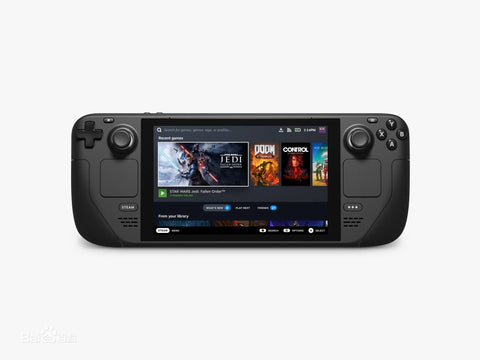
The Steam Deck is rather bulky compared to what one might call a portable gaming system, with its almost one-foot-wide form factor and weighing almost one and a half pounds. Although both the Nintendo Switch and the Steam Deck feature 7-inch screens, the Switch, when combined with its Joy-Con controllers, is over two inches thinner and half a pound lighter. The Steam Deck can be stored in a bag, but it's too large to be played bundled on the subway.
The non-removable, oversized control surfaces and grips of the Steam Deck take up a significant portion of the device's overall footprint. All the usual controls are present here, including the left and right analog sticks, four menu buttons, a directional pad, and four face buttons.
Square touchpads are located above the Steam and Option buttons, directly below the analog sticks. The width of the grips, by the way, ensures that your thumbs and the flesh of your palms do not inadvertently touch the trackpads or block the speakers placed below the Steam and Option buttons.
On the top of the Steam Deck are the usual L1/R1 bumpers and L2/R2 triggers, although the bumpers are a little too high for quick, comfortable pressing. Power and volume controls, a 3.5mm jack for headphones, and a USB-C charging port complete the package. A microSD card slot is located on the bottom edge of the device.
You'll find the L4/L5 and R4/R5 buttons on the back of the device, roughly where you'd normally place your middle and ring fingers. The buttons may feel a little too stiff and flat, but the additional inputs they allow are well worth the compromise. On the back there is a huge intake grille that works together with an exhaust fan, and a grille on the top edge of the device to ensure proper ventilation.
Performance and Connectivity
Processing in the Steam Deck is handled by an AMD APU, which integrates the central processing unit and the graphics processing unit. The processor has a clock speed of 2.4 GHz to 3.5 GHz and includes four cores and eight threads.
However, you can choose between 64 GB eMMC storage, 256 GB NVMe SSD storage, or 512 GB high-speed NVME SSD storage. All models support external storage expansion via microSD, although they may slow down game loading times.
The Steam Deck only has one USB 3.2 Gen 2 USB-C port. However, it is capable of handling almost any wired connection, including charging the Steam Deck. The Valve Steam Deck has video and audio output via USB-C and DisplayPort 1.4. In case you were wondering, the Steam Deck is compatible with any normal USB-C dock, so you can't add more ports and an HDMI output, but it can also be connected to a Steam Deck Dock or LapDock to switch back to PC Steam. Also known as Steam Deck desktop mode, like this video:
Display
In addition to its impressive computing power, the Valve Steam Deck also features a vibrant 7-inch IPS LCD panel with touchscreen support. With a native resolution of 1280 x 800 and an average brightness of 400 nits, this optically bonded IPS LCD panel offers excellent color depth. Some games showcase the beautiful and dynamic color palette the screen offers.
Nevertheless, the screen's performance can be quite unsatisfactory in darker games. In some games, the IPS glare can become harsh in the corners of the screen. The ambient light sensor still does a good job of reducing screen brightness when you play in less lit places, although you may not be able to eliminate the edge glare.
Audio
The sound quality of the integrated dual speakers is excellent. These drivers are truly powerful and do not lose clarity even at high volumes. The Steam Deck supports Bluetooth 5.0 and has a 3.5mm headset jack for private listening.
Battery Life
As with any other portable device, the battery life of the Valve Steam Deck varies depending on how you use it. Valve estimates that the Steam Deck's internal 40-watt battery can achieve "2 to 8 hours of playtime."
Typically, more demanding games with higher graphics settings are more likely to drain the battery faster. Newer games, especially those with high graphics and processing requirements like some 3D games, may only offer 90 minutes of playtime on a single charge, while older games with lower requirements may even offer 6 to 7 hours.
By changing settings like graphics intensity and screen brightness, you can get the most out of your battery life. The Steam Deck has a directly integrated 45-watt USB-C charger, and a full charge takes about three hours when the device is off and not in use.
When is the Steam Deck release date?
In February 2022, Valve's highly anticipated Steam Deck handheld console finally hit the market.
Keep in mind that Valve set the Steam Deck release date for December, with shipping to begin shortly after customers placed Steam Deck pre-orders. Due to supply chain concerns, Valve ultimately had to push back the Steam Deck release date by two months.
You can now place your Steam Deck pre-order for available units on the Steam website. For just $5, you can place a Steam Deck pre-order for one of the three versions of the Deck, with the cost credited to the Deck's final price. Make sure your Steam account is in good standing and has made some purchases before June 2021 to be eligible to pre-order your Steam Deck.
Once you've pre-ordered a Steam Deck, there will be a waiting list, and you'll be notified when it's available for you to purchase.
What is the Steam Deck price?
There are three different models available, each with a different Steam Deck price depending on how much storage space it offers. The Steam Deck price is $399, $529, and $649 for the 64GB, 256GB, and 512GB versions, respectively.
The higher Steam Deck price includes faster NVMe SSD storage, while the cheapest Steam Deck price is advertised with a 64GB eMMC storage solution. All three models can expand their storage space with a MicroSD card.
Is the Steam Deck worth buying?
The Valve Steam Deck is a great option if you value high-quality portable gaming, have a large collection of Steam titles, and appreciate minimalism and efficiency.
If you use the keyboard model, you can enjoy the operator experience of a desktop computer while also using an additional monitor. This is an excellent feature that pushes the boundaries of gaming even further and significantly enhances the gaming experience.
Conclusion
The Steam Deck, with its great design and impressive features, revolutionizes the way gamers can enjoy their Steam libraries. Its brilliant features include its aggressive form factor, powerful gamepad, and remarkable focus on ergonomic design. The Steam Deck is almost flawless, but it does have a few minor flaws. We hope this Steam Deck review has helped.






Leave a comment