

Differences between color spaces sRGB, NTSC, Adobe RGB, DCI-P3
Color space is an important consideration when selecting a color for a design. It is important to understand the color gamut. When choosing a color for a project, you need to use the color selection to measure your colors. This is done according to the principles of color space. Understanding color space and the differences between them is an important skill for anyone who uses a computer.
Here you can learn about the different color gamuts such as Adobe RGB, sRGB and DCI-P3 color spaces. Designers would benefit enormously from this, as there are a plethora of different color gamuts to choose from. This post will explain the differences between the various color gamuts and which one is ideal for your particular design.
What is Color Space?
The term "color space" refers to the color palette that a device can produce. The wider or broader the color space, the more vibrant and saturated the colors can be. A phenomenon known as "clipping" occurs when color gamuts become smaller, and rich, saturated colors are compromised as a result. Converting from RGB to CMYK demonstrates this clipping problem most clearly, as most of the rich colors in RGB are absent in CMYK. In addition to color gamuts, display devices such as monitors can also display a wide variety of colors. Ideally, your display gamut should be at least as large as or even larger than your printer to avoid preview overlaps and ensure accurate representation of your photos.
It is also important to consider your workspace's color space before deciding on RGB. sRGB, Adobe RGB 1998, and Pro Photo RGB are three of the most commonly used RGB working color spaces, with their primary variation being their color gamut or size. The least of the three is sRGB, followed by Adobe 98 and Pro Photo, both of which are medium to large. While other additional RGB workspaces are available, and you might even design your own, it is important to have a good grasp of these three, as they serve as the foundation for all subsequent explorations. Before delving into the specifics of each of these color spaces, it is important to note that all monitors can only display colors within the sRGB color space.
-
Representation of Color Gamuts
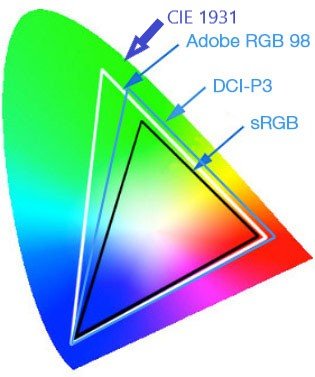
The representation of color gamuts is done through triangles in a three-dimensional color diagram. The color coordinates for the red, green, and blue hues are represented by the edges or sides of the triangles. As represented by the triangle, each gadget has a specific variety of colors it can display. These are the colors that can be displayed by any monitor covering 100% of the sRGB color space in the example above. It is important to note that no specific color space can perfectly reproduce all the colors that the human eye normally perceives.
-
Why Do Different Colors Look Different on Different Displays?
A monitor's color space varies from manufacturer to manufacturer. For example, it is not always possible for all monitors to produce 16.7 million colors. This means that the display of colors on different displays can vary from one to another. To further illustrate this point, the same information can be displayed in different colors on two different monitors. Photographers and videographers face an enormous challenge because displays are not capable of reproducing the same colors everywhere. The ability of your camera to produce consistent, accurate color images is an important aspect when taking photographs.
Color Space Difference Between NTSC, DCI-P3 Color Spaces and sRGB, Adobe RGB?
The differences between the sRGB, NTSC, Adobe RGB, and DCI-P3 color gamuts (see below) illustrate the differences between the color gamuts of these television systems. Upon closer inspection of the table below, it becomes clear that the color gamuts of the three television broadcast standards (NTSC, Adobe RGB, and sRGB) are extremely similar. However, there are some differences between the two. Adobe RGB is significantly larger than the DCI-P3 color gamuts, as well as the sRGB color space, both of which are considerably smaller. Furthermore, 72 percent NTSC is almost equivalent to 100 percent sRGB in terms of color gamut.
What is sRGB?
A color space or color collection called sRGB was developed in 1996 by Microsoft and HP to standardize the colors displayed by electronic devices, and has since become the norm. Windows, some web browsers, and many console and portable monitor use sRGB as their primary color space, unless they are HDR-capable. On a wide color gamut monitor, sRGB mode is often among the picture presets and color temperature modes. Most picture presets for color schemes are usually found in sRGB mode, even on displays with a standard color gamut. sRGB mode simply reduces the monitor's native color space to 100% sRGB, allowing you to see true sRGB colors on your screen.
When it comes to color accuracy, everything depends on the monitor's factory settings. Among the visual settings, the sRGB setting is equally important. When displayed in sRGB mode, the brightness of many wide color gamut displays is fixed at one of two extremes: (extremely high/extremely low).
It does not matter how realistic the colors are if the screen is brighter or darker to work within the sRGB setting. If your display is set to sRGB mode and has a fixed brightness setting, you may be able to circumvent this problem by accessing the service menu or using a third-party tool like ControlMyMonitor. These techniques are not universally applicable, but they are worth a try because they are simple. Color temperature is another crucial variable that is often blocked in sRGB mode. Locked color channel settings make it difficult to correct a monitor's color inversion in sRGB mode from 7000K outside the norm, which for example results in a cold/bluish white point instead of the standard target of 6500K. Unless you already own a colorimeter, make sure that the sRGB mode of the monitor you are considering offers adjustable brightness and good factory calibration with a low Delta-E value if you need a wide color gamut display for color-critical work in the sRGB color space.
-
Alternative to sRGB
sRGB can be enabled in AMD GPU drivers by setting "Custom Color" to "Enabled" and "Color Temperature Control" to "Disabled". However, it is worth experimenting with this strategy if your monitor already has an sRGB option. However, you should not use sRGB and AMD mode simultaneously. Re-adjust and profile the display if you have a colorimeter to get the best results with these settings. Despite NVIDIA's lack of support, a user on GitHub, ledge, managed to bypass this by creating a tool called "No Video sRGB."
-
sRGB Standard
sRGB was established in 1999 by the IEC (International Electrotechnical Commission). The International Commission on Illumination (CIE) used the CIE 1931 XY Color Quality Diagram to define a color space (CIE). BenQ has published something called CIE 1931 XY Color Quality, which shows the entire color spectrum that the eye can perceive. The sRGB color space is delimited by a white triangle in the center of this palette. On an sRGB display, for example, all additional colors outside the triangle would appear incorrectly and undersaturated. The following graphic shows the most commonly used color spaces. The coordinates in the color quality diagram above are used to determine the color range in a color space. It is also known as Rec.709 or even ITU 709 and was developed for HDTVs as the International Telecommunication Union Radiocommunication Sector (ITU-R's). The 8-bit color model of sRGB. The gamma value for the sRGB color space is 2.2.
Related Reading: How to Choose a Monitor for Your PC?
What is NTSC?
NTSC simply stands for "National Television Standards Committee." NTSC was founded in the 1940s by the Federal Communications Commission (FCC) to develop a standard color television system for the US. The color property of your television is controlled by the NTSC-standardized color scheme. Before the introduction of the NTSC standard, there were various competing systems. On June 17, 1953, the FCC established and adopted the NTSC standard. The FCC recognizes the standard as the primary color television network in some areas of South and North America. In 2011, the ATSC 3.0 system was introduced, which changed the NTSC standard. Most people will confuse sRGB and NTSC. You can easily calculate. 72 percent NTSC is approximately equal to 100 percent sRGB.
-
Transition from Monochrome to Color
With the introduction of commercial NTSC broadcasting, which began in 1941, owners of black and white televisions in the US could finally watch their favorite shows. Then, auxiliary carrier frequencies were developed to provide a color signal in addition to the black and white signal, and in January, color television made its debut 1. 1954. Preliminary prototypes of electromechanical systems were used to create the first, rudimentary video images before electronic television became the standard.
-
The NTSC Standard
The New Television Standards Committee (NTSC) broadcasts 60 half-frames per second, or 60 "fields" per second in television jargon. The interlaced resolution of NTSC was 525 lines. For each half-frame, the CRT had a "Vertical Blanking Interval" (VBI) of 21 lines, which was used for repositioning the electron gun between images. Take a look at interlacing and raster scan. The resolution of a digital video camcorder (DV) of 720 x 480 pixels corresponds to that of NTSC (see DV). 704 x 480 pixels is the digital television equivalent (see DTV). The red, green, and blue hues of NTSC are mathematically represented by the YUV color space. Also included are FM and MTS stereo audio signals.
Several common commercial digital video formats are compatible with NTSC televisions. VCD, DV, and DVD are examples of these formats. The standard strength for each format is listed in the table below. When converting DV to other options such as MPEG-2 for DVD, the full frame indicates the "most active area" of the images and may require resizing and margin additions to the sides. As a result, DVD players may incorrectly apply digital-to-analog conversion, causing the "full frame" to be compressed into the most active area format of analog video.
|
Format |
NTSC Resolution |
|
DVD |
720 x 480 - 704 x 480 - 352 x 480 |
|
SVCD |
480 x 480 |
|
VCD |
352 x 240 |
-
Regions and Countries Still Using NTSC
- United States
- Canada
- Colombia
- Mexico
- Taiwan
- Japan
- South Korea, etc
What is Adobe RGB?
Adobe RGB is simply a color model created to encompass most colors perceivable by the human eye, as well as the ability to display colors that are not visible. It is used in web photography and printing for professionals. The sRGB color space has already established itself as the standard. It is the color model that defines online colors and is used by all common monitors today, used by a large number of people and millions of PCs. Users who want consistent colors on their PCs and designers who want to keep their visual representation as simple as possible should use sRGB. sRGB is a color space that is smaller than Adobe RGB. The 100% Adobe RGB screen was developed for professional photography and video production. This is the most commonly used color space in any business and offers a wide variety of colors, which is extremely useful for images and movies. When using your Canon EOS camera, you have a choice between two different color spaces: Adobe RGB or sRGB. sRGB is the other option.
-
Methodology
RGB data is used to display images on computer screens. When it comes to transmitting visible light, the RGB system is used in all imaging systems, including digital projectors and television screens. To obtain white, you mix all three colors when no light is transmitted. Between these extremes, a wide range of hues can be achieved by varying the intensity of one, two, or three colors. However, if you try to print your image, this solution will not work correctly. Unlike paper, which transmits light, paper only reflects it. A muddy brown color is obtained when mixing red, green, and blue ink. White paper does not turn black if no ink is used, and vice versa. The CMYK printing process is used for printing on paper.
-
Advantages of Adobe RGB over sRGB
Adobe RGB (also known as ProPhoto RGB) is overkill for transferring images between devices when sRGB is available. A popular saying states that sRGB can represent 16.7 million colors. In Adobe RGB, 16.7 million colors can be represented. Why is there such a difference? Our answer is simple: because we are not talking about the same 16.7 million shades. Five colors in each example, but the crayon produced darker colors than the standard pencil. It was impossible to achieve the darker shades of the crayon with the pencil. Adobe RGB can represent colors that sRGB cannot. The same applies to the different RGB color gamuts. CMYK printing can still reproduce sky blue as vibrantly as sRGB printing, but the sRGB image cannot. The blue of ProPhoto RGB is even more intense than the blue of Adobe RGB.
To be consistent with any other RGB color space, the red, green, and blue colors in sRGB have very specific chroma distributions. This limits the sRGB color space in terms of representable colors. Furthermore, it cannot show all colors that humans can see, which I had never thought of before. I used to believe that RGB could represent every hue. RGB itself is not a color space at all, but rather a model for describing colors in general. Secondly, color gamuts like Adobe RGB and sRGB could only represent a fraction of the visible color spectrum on a computer screen. This is especially true for green and turquoise, although sRGB also has a problem with strong blue and red. It fixes the problems with green and turquoise, but there are also problems with blue and red. It is the one where these problems do not occur, although it also has additional shortcomings.
What is DCI-P3?
The DCI-P3 color space has been established in the display and projector industries as an updated model of the DCI color space. DCI-P3 is slightly more saturated in the primary color zones of green, blue, and red, but has comparable color points. Due to its advantages over the current sRGB color space, DCI-P3 is becoming increasingly popular in the consumer industry. The use of DCI-P3 is currently voluntary within the UHD Blu-ray specification, and consumer electronics manufacturers are not required to support it. The Digital Cinema Initiatives and the Society of Motion Picture and Television Engineers (SMPTE) have sought to standardize the colors of the film industry with the creation of the DCI-P3 or Display P3 color space or color set.
You will also read this as "DCI-P3" on some of the best gaming monitors, as well as on televisions and OLED Touch Monitor displays that use a form of the color space called DCI-P3-D65. Monitors with the DCI-P3 color space are best suited for HDR content and anyone who prefers a richer color representation. When you buy a PC monitor, television, or other device, the vendor may promise that the product offers a certain percentage of the DCI-P3/P3 color space. The monitor can reproduce the following DCI-P3 color space. A monitor's color space indicates which color spaces it can represent and how much of each color space it can represent.
-
DCI-P3 vs. sRGB
When printing or browsing the internet, you will likely find sRGB (or Standard Red Green Blue) to be the most widely used color space. It was developed by HP and Microsoft and is used to display images on the internet. Although widely used on most digital screens, it does not provide the sufficient color coverage required for professional applications. DCI-P3, as mentioned earlier, offers 26% more color space than sRGB. With DCI-P3, more rich and saturated colors are available than ever before. Compared to sRGB's 8-bit color depth, HDR material can be displayed with 10-bit color depth, allowing consumers access to even more vibrant hues. DCI-P3 is the best choice for video editing, unless your videos are intended for online display.
-
DCI-P3 vs. Adobe RGB
DCI-P3 and Adobe RGB have many more colors in common than sRGB, which was developed by Adobe. Both monitors feature a wide color gamut, a new television technology that provides more vibrant colors. This is the time to think in brighter reds, greener greens, and deeper blues. DCI-P3 uses yellow and red tones, while Adobe RGB uses blue and green tones. As a video editor, you can use the former, but if you are making a film for cinematic release, you will need DCI-P3. For image editing and printing processes, Adobe RGB is the best choice. There are fewer gaming or film monitors that use Adobe RGB, as it does not offer the same multimedia potential as DCI-P3.
-
Workflow Considerations for a DCI-P3 Display in Production
Working with a P3 display is no more difficult than with an sRGB or Adobe RGB monitor. You can select a specific display profile using your Windows or Mac system options. Color-managed applications such as Photoshop Lightroom, Photoshop, and InDesign automatically use this profile when you open these programs. P3 displays are not a problem if the chosen display profile describes them adequately. Color-managed programs can reproduce consistent colors in P3 settings, provided photos and other materials are tagged with an appropriate color profile.
In InDesign, Photoshop, or Illustrator, the "Edit and Color Settings" field is probably not something you want to mess with. Your workflow, not the monitor you use, should determine how you set up your color settings.
When working with apps that do not use color correction, such as some browsers, video editing tools, and web design software, it is a bit more difficult. Using an Adobe RGB or P3 display in an application that does not use system-level color management can result in oversaturated colors. To limit the display's color space to sRGB without using the computer, some wide color gamut displays have this built-in feature. Workflows without color management can benefit from this technique to avoid oversaturated colors. Apple P3 displays and other wide-gamut displays do not have this option. Another solution is to use a cheap sRGB display connected to your computer to display information that is not color-managed.
Controlling Multiple Color Gamuts with Color Management
The display's firmware, CPU, or GPU can perform digital color management to enable additional color gamuts such as sRGB/Rec.709, which are smaller than the display's original color gamut. The R, G, and B values of each pixel are first mathematically altered so that they are closer to the white point in terms of colorimetric saturation. If the content being displayed has an internal tag that identifies its native color space, and this tag is recognized by the operating system or the display's firmware, the user can manually select one of the various color spaces. Switching between the DCI-P3 and sRGB / Rec.709 color gamuts is automatic. For a more comprehensive color management strategy, the content should include metadata that specifies the content's colorimetry in great detail, which is then implemented by a display using its traditional color gamut colorimetry and photometry.
Choosing a Color Scheme is a Complex Decision
-
Best Choice for General Use: sRGB!
In most cases, sRGB is the best choice. It is unlikely that a device or software can handle files encoded in the sRGB color space as expected, even if it is not the largest color space and is not suitable for high-quality photo applications.
-
Best Choice for Sharing Images Online: sRGB!
The sRGB color space has emerged as the de facto standard for displaying images on the internet. It is the best option if you want to put your images online in any form. Use sRGB if you are posting on Facebook or Instagram; it's hard enough to make photos look good on those platforms anyway.
-
Best Choice for Image Editing: ProPhoto RGB or Adobe RGB!
In a regulated, closed editing workflow, the largest possible color space should be used. I use ProPhoto RGB, which offers a larger color range thanks to Lightroom and is a popular choice. If your program supports sRGB, there's no reason not to use it when modifying images. However, if you have access to a wider color palette, you should take advantage of it.
-
Best Choice for Sending Images to a Client: sRGB!
Send your photos in sRGB to avoid clients complaining that they are dull, faded, and flat. See below if your client is an image professional.
About UPERFECT
UPERFECT was founded in 2017 as a brand built on decades of research and experience, with the sole goal of teaching people how to upgrade their displays to up to 4K and improve their lives with our mobile touchscreen monitor. At UPERFECT, we understand the real-time challenges people face around the world and are fully committed to addressing them by providing high-quality, personalized monitors for current technologies with professionalism, integrity, and respect.
Conclusion
A good color gamut on your display can drastically impact the appearance of your photos and videos. To get the most out of your work, it is important to understand the color space you are dealing with. Many cameras today allow you to choose between sRGB and Adobe RGB as the color space for your images. They apply to JPGs created with the camera. RAW files are excluded from this application (although thumbnails may be displayed in the JPGs).
For more information, please visit: https://uperfect.de/.






Leave a comment