

What is LG Screen+ and how is it used?

LG Screen+ is a new feature of LG devices running Android 11. Users can enable the Always On Display feature on their phones. Even if the screen is off, you can use this feature. This new feature is called LG Screen+. This feature is specific. It is not available on all LG devices. It was designed specifically for LG V50 or LG G8x.
In other words, your phone must have the LG Screen+ feature enabled before you can use the Screen+ feature. Always On Display is enabled by default. To enable LG Screen+, you must go to Settings > Display > and check the box next to LG Screen+ or related settings. After changing your default settings, you can now use this feature.
It is the best feature LG has ever introduced. It combines the Dual Screen Display feature with a screen sharing feature. You can project your screen to a compatible display. There is no need to download anything special. Just go to settings and get a larger display with LG Screen+.
How to use LG Screen+ on LG devices
You can enable LG Screen+ on your device if you have Android 11. Go to Settings > Display > and check the box next to LG Screen+. Just tap the icon to enable LG Screen+. In the same way, you can enable Always On Display on your LG phone. However, LG Screen+ is much more practical than Always On Display. You can enjoy the screen sharing feature and see larger displays.
To access this feature, make sure both devices are connected to the same Wi-Fi network. On your desktop, go to settings and turn on the screen sharing option. You cannot use Screen+ if your external device has disabled the screen sharing option.
LG Screen+ works similarly to Samsung Dex. However, make sure you have enabled screen sharing on both devices.
Difference between Dual Screen and Screen+
LG has been working to provide its users with the best features. To understand the difference between the two, let's look at their work and features.
Working on a Dual-Screen
First, you need to attach your device to a dual-screen using a dual-screen case. Then, enable the dual-screen option via the screen option.
After switching to the Dual Screen option, access the dual-screen menu. From the menu, you can control the dual-screen settings. You can swap screens and turn them on or off.
To further customize the settings of a dual-screen feature, go to settings. Select the display and dual-screen options. From here, you can adjust the brightness and background on the dual-screen.

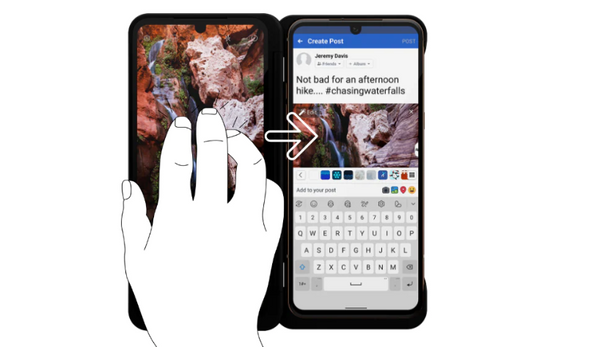
To instantly swap screens, use a 3-finger swipe gesture. The image below illustrates the use of this feature.
While using a dual-screen feature, you can use an LG gamepad. This way, you get a console-style feel.
Sharing screenshots with two screens is easy. Press the button shown in the image below to get an instant screenshot sharing shortcut.

Working with LG Screen+
Working with an LG Screen+ is easy. Screen+ only works with Android 11. Just go to settings. Turn on screen sharing. Make sure your external device is also connected to the same network. If your external device has screen sharing, you can use your phone on the large display. LG Screen+ works better on an LG TV.
If you use a touchpad to use the keyboard, a delay error will be issued. Use a wireless keyboard to ensure this problem does not occur. In addition, connect the Bluetooth keyboard or mouse to the mobile phone. Otherwise, it will be slow and delay commands.
How to use screen lock on LG
To lock your phone, you need to enter your PIN or pattern. However, if your phone is locked and Always On Display is enabled, you can also lock your phone by swiping down from the top of your LG. This will hide the content on your phone and activate the lock screen. You do not need to enter a pattern or PIN to activate the lock screen.
How to enable Always On Display on LG Mobile
You need to find out if your phone has this feature by going to Settings > Display > and checking the box next to LG Screen+. If it is enabled, you should see the red icon on your left lock screen. Just tap the icon to enable Always On Display.
How to use screen protector on LG Mobile
The screen protector is a special feature that comes with phones. It is a plastic cover that protects your phone's screen. The cover is made of silicone-reinforced glass. This makes the glass extremely strong but shatterproof. The cover is designed to protect your screen so you don't have to worry about the screen scratching or breaking. If you buy a phone with a screen protector, it comes with a plastic cover for your phone's screen. You can also buy replacement covers at an authorized LG retail store. All you have to do is give them your phone's model number, and they can install the cover for you.
Conclusion
LG has always been committed to improving its users. They have introduced many features in all their devices, including phones and TVs. V50 and G8x are phones with two amazing features. The first is the new Infinity Display. The second is LG Screen+.
These two features work together to give you an unparalleled experience. You can now use your phone with the display off. You can also use a dual-screen feature for a better gaming experience. You now also have an option for LG Screen+. However, you can only enable this feature if your phone has an Android 11 update.
Also, these two properties work hand in hand. If you enable Always On Display, your screen is additionally protected by a screen cover. This makes it much safer to use your phone when the display is off. If you use a dual-display feature, you can have a better gaming experience. If you use the LG Screen+ feature, you can easily use your phone on a larger display. In addition, with Screen+, you can use your desktop on your phone.



Leave a comment