

Test out the UPERFECT Tri-Screen Laptop Workstation from Tecnopasion there
|
Table of Contents [Hide] |
Introduction
Today, I'm bringing you a super interesting product. It's an UPERFECT Z 14, and many of you might be wondering, what is that? Well, it's a gadget that allows us to work with three screens simultaneously. Let's take a look.
I've tried several external screens, but I've never been able to achieve this type of productivity booster. And yes, you heard that right. It's a potential productivity booster. You waste less time tabbing through screens, which is extremely useful and cool. Really cool. In this video, we'll do a very quick unboxing so you can see everything that comes in the box, and then we'll boot it up and test everything it can offer us.

Unboxing the UPERFECT Z Tri Screen
So, once we've opened the box, the first thing we find after removing the protection is the screens themselves. We'll see them in much more detail now, and I can tell you they are very well protected, so there are no scratches. When we remove the second layer of protection, what we find are the cables that come with the box. There are several, and I warned you that it comes with two USB-A and two Type-C cables. Too many HDMI. Two HDMI cables to connect the screens to any computer laptop. In fact, there are two, one for each screen. It also comes with flat USB-C to USB-C cables for our modern laptops like MacBook Pro, where I will be testing it, and this purple cable, which is meant to power the screen and provide maximum performance if you don't connect via USB-C. In addition, it also comes with an instruction manual in English. Now, these are the screens, which are nothing more and nothing less than full high definition. They are available in several languages, and to use them, you just have to rotate them once to each side. So, when unboxing, we opened the first and then the second. It comes very well protected, which is appreciated so nothing breaks, and it's very easy to use and it's very nice and aesthetic. The only thing to consider is the correct position. For example, I did it the other way around, and that's why I'm showing it to you so you don't make the same mistake. Now it folds to the right, and the one behind folds to the left, and that's correct. As you may have noticed, we can have a single additional screen or both, depending on what we want. And how does it connect? Look, we're going to connect it to the laptop with these hooks, and with the equipment, we can adapt it to any type of screen between 13 and 16 inches.
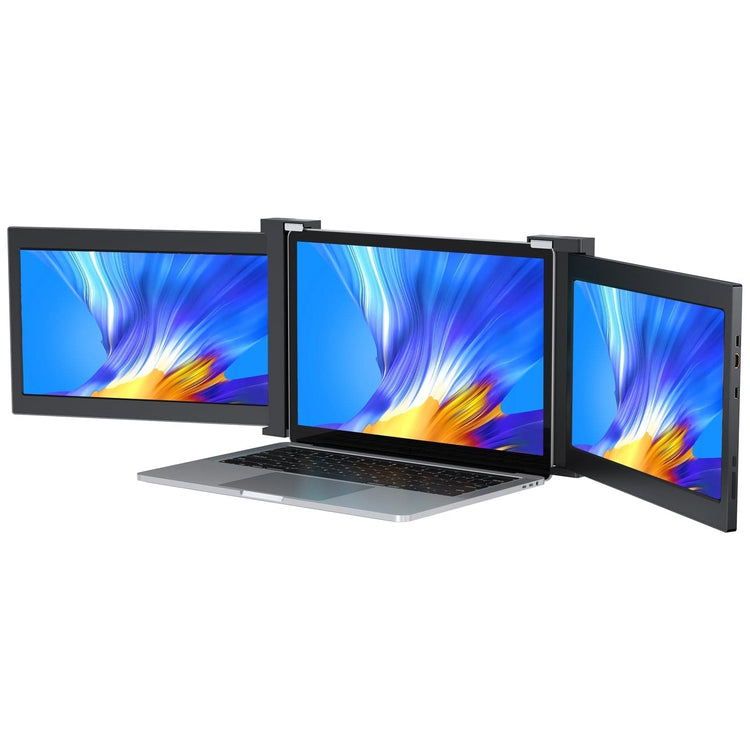 UStation Z 14 - Tri Screen Laptop Monitor Extender Triple Display PortableFrom €359.99
Screen size: 14 inches
Resolution: 1920 × 1080 (FHD)
Refresh rate: 60 HzPanel type: IPS
Display ratio: 16:9
Viewing angle: 178°
Dual Screen Review
The truth is that even though these screens are covered in plastic, they look robust, which I like. It doesn't weigh much. I thought it would weigh much more here. We can see the USB-C inputs, the mini-HDMI, and buttons for the OSD menu. Before I show you how to place it, you just need to know that this part is used to lean the laptop back and support the weight of the dual screen, although you may not need it depending on your laptop. Okay. It's time to connect it to the laptop first. I tried to do it with the laptop closed and mount the dual screen on top.

Setting up the Triscreen
I found that I didn't have enough space between the screen and the keyboard for that. So that method didn't work for me. I recommend opening the laptop screen first and then placing it. But if you look at the video here, I made a mistake, and that's why I'm showing it to you so it doesn't happen to you. It has some hooks that are super important. It doesn't make sense to only place the top hooks; you also need the two bottom ones. Otherwise, the screen will hang like mine did. Don't worry, they are protected and won't scratch the screen. We can also attach the rear support to bear the weight if you want. In my case, with the MacBook Pro, it's not necessary. Once you've done this, all you have to do is connect each screen, and once you've connected it, the computer will recognize it. When we connect the next one, the computer will also recognize it automatically. What can we do, perhaps, to order the screens? I'll show you that later, and that would be almost everything for now. You can now enjoy the most from these screens and your laptop. You can select any tab or app and move it wherever you want. This is very useful for me in terms of productivity. For example, if I'm doing accounts on one side, I can have the spreadsheet on the other side. I can have the company data I need to work with, or if I'm programming, which is so useful for me. I can have a tutorial on the left, the program on the middle screen, and then see the results on the right screen.

How the UPERFECT Z Works
As you can see, the transmission is instantaneous. It's good that it's adapted to 3.1 or Thunderbolt. If you want, you can use it only with your laptop's battery. But be careful. It's not the same effort for your laptop to display content on one screen as it is on three; it takes much less. You have to keep that in mind. Another great utility it has is that if you only want one screen, you can do it by simply unplugging it and folding the left one. Or if you are with a client, you can turn the screen to the left so your client sees what you want to show them, the presentation, the video, whatever. Well, you've ordered this on your screen, you just have to worry about keeping the cables tidy.
Screen Sorting
If you're wondering if it's difficult to order the screens? Well, not at all. You just have to do it the way I show you on the screen and arrange them so that the mouse follows the adjacent screen. Very easy to use. If you're wondering where I got it. It was from New Perfect Monitor dot com. I searched for the perfect set. Three screen. It says it's for 13.3-inch laptops, but it can fit 15-inch laptops like mine, or up to 16-inch. You can see that there are discount coupons so you can get it cheaper. And if you look closely at the technical specifications, the screen, as I said, is 13.3 inches. It's also a Full HD connection. I did it with USB-C, but you could also do it with Mini-HDMI. It can be adapted to any screen between 13 and 16 inches and increases productivity by 200%.
Opinion
That's right. It really increases it. At the end of the day, you're not tabbing, you're staring at the screens and directly looking for the information you need without having to navigate between tabs or windows. I'm used to working with very large screens, and it's much easier to work with these two additional screens on the laptop. It's a very curious device that I've wanted for a long time. This is so cool. I've used it in my camper van, and it's very useful. What do you think, do you have one? Do you find it useful? I'd love to read your comments.



Leave a comment